

Every product in a meeting assistant category claims the same three things: accurate transcripts, useful summaries, hours back in your week. All broadly true. None of it helps you choose.
What actually separates these tools is architecture — decisions made early, that you can't change in settings. This page walks through the five that matter, says where each tool lands.
What we built, and why it's shaped differently
Most meeting tools are recorders with AI bolted on afterwards. The transcript is the product; the AI reads it once the call is over.
We started from the other end. Meetia is AI-first from the ground up — an assistant that happens to transcribe, rather than a transcriber that happens to have a chat box. Everything in the product exists to give that assistant better context.
A Smart thread isn't a recording. It can be a live meeting, a plain AI conversation with no meeting attached, or both at once. Brief the assistant before the call, ask it things during, keep going afterwards — all in one place. And a thread doesn't end when the call does: reopen it next week and add the next meeting, so a recurring 1:1, a standing sync, or an ongoing client relationship becomes one continuous record instead of fifteen disconnected files.
A workspace is the boundary of what the assistant knows, and it holds more than meetings. Every thread, every transcript, and every document you add to its knowledge base is indexed together into one project memory the AI reasons across.
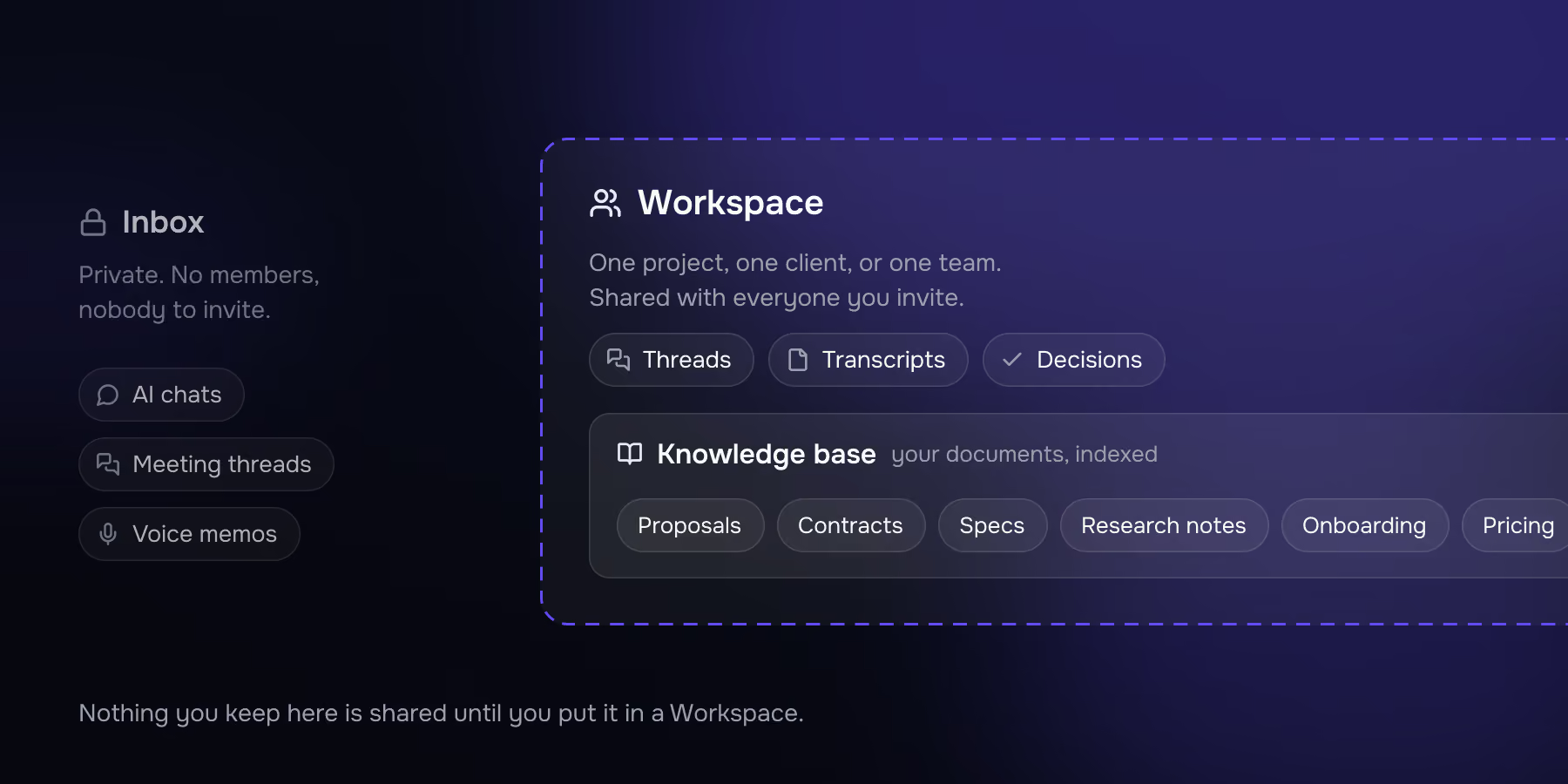
Your Inbox is a private space for AI chats, meeting threads and voice memos — the same assistant, no workspace and no colleagues required. Most people start there: a personal notetaker that happens to remember everything.
Meetia is a brain for your conversations and the material around them. Personal in the Inbox, shared in a workspace. And because it speaks MCP in both directions, it's built to sit inside your company's wider knowledge ecosystem rather than beside it — pulling your tools into the meeting, and exposing what it knows to the other AI tools you already use.
The five questions that decide this
1. Does the AI help during the call, or only after?
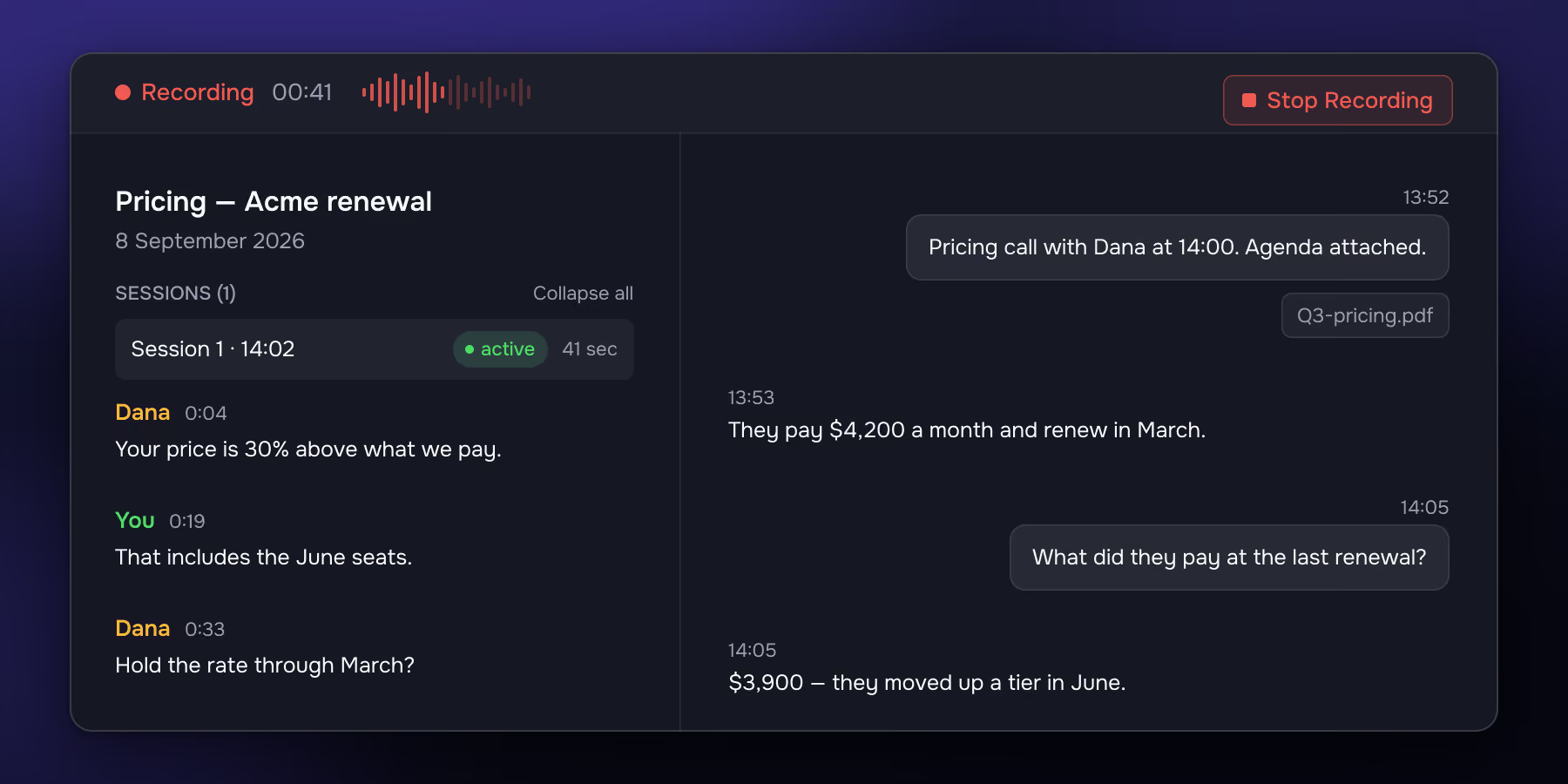
Most of the category is post-meeting by design. The bot leaves, a summary arrives, you read it later. Two things to know: that chat is scoped to what's been said on the call, and it isn't saved — leave the screen and it's gone.
Meetia treats the live conversation as the main event with real-time transcription. The chat and the transcript sit side by side in the same thread. You can warm the assistant up before the call — paste the agenda, drop in context, tell it what you want out of the meeting — and it walks in already up to speed. During the call you can ask it anything, and the whole exchange stays in the thread as part of the record.
2. Does it know your project, or just this meeting?
Almost every notetaker treats a call as a self-contained document. Ask a question, get an answer from that transcript. Better tools let you search the archive afterwards. But the archive is still a pile of separate recordings, and none of them know anything about your business that wasn't said out loud on a call.
Meetia is organised around the workspace instead of the individual meeting. A workspace is one project, one client, or one team. Four things turn it into a memory rather than a folder of files.
Threads that continue. A thread isn't tied to one call. Reopen it and append the next conversation, and a weekly 1:1 or a standing client sync builds into a single record with its full history in context. Every other tool in this comparison files each meeting separately; if you want the arc of a relationship, you reconstruct it yourself.
A knowledge base you can put things into. Every workspace has a Knowledge base listing what's indexed for retrieval — your documents alongside the transcript of every meeting in that workspace, each with a visible indexing state, so you always know what's searchable. Proposals, contracts, specs, pricing sheets, research notes, an onboarding doc. PDF, Word, plain text, Markdown and images.
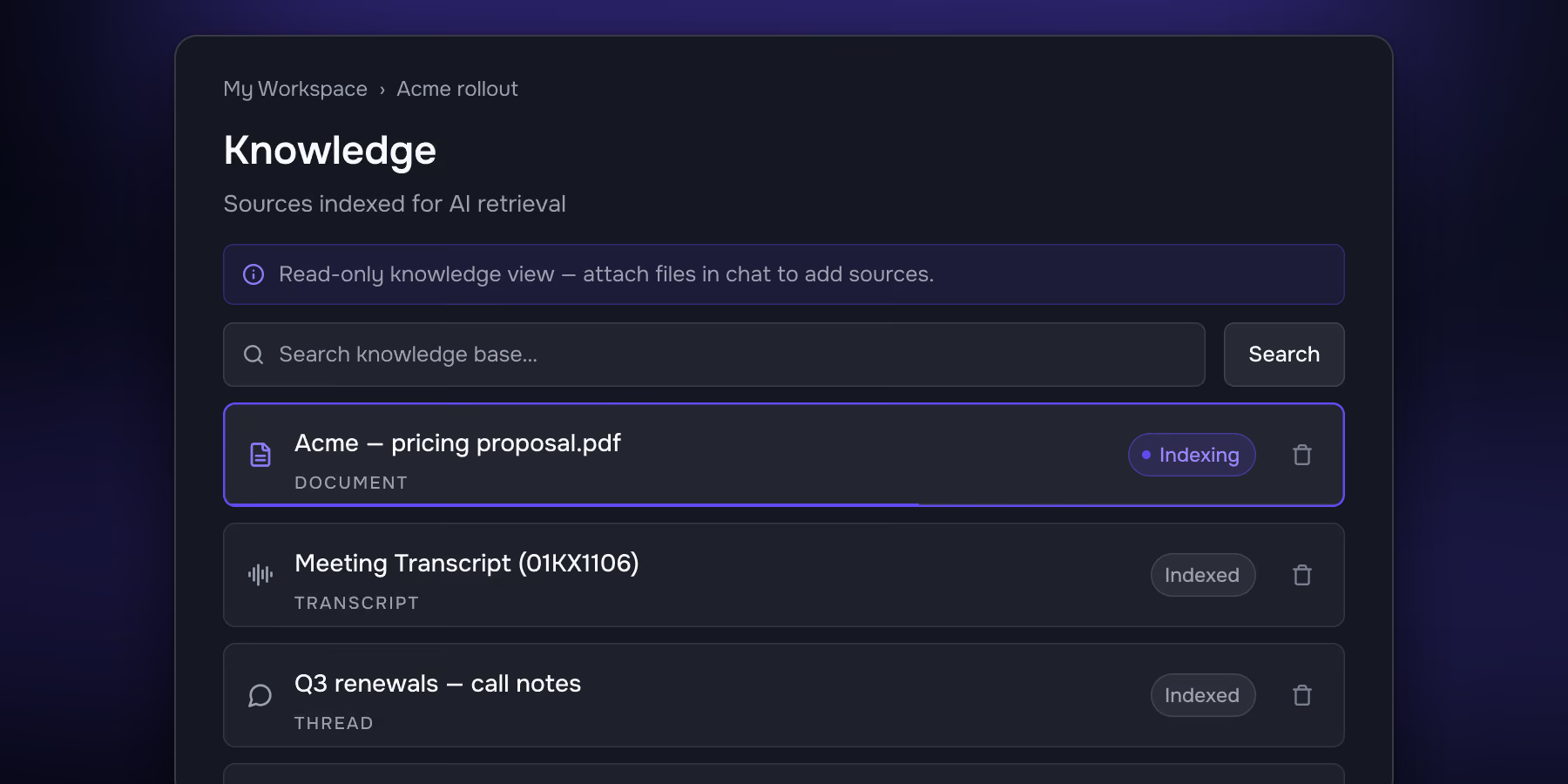
Persistent memory. Add a document to the workspace and it becomes part of the project's permanent memory — available to every thread, before, during and after any call. Or attach a file to a single chat message when it's only relevant to that question.
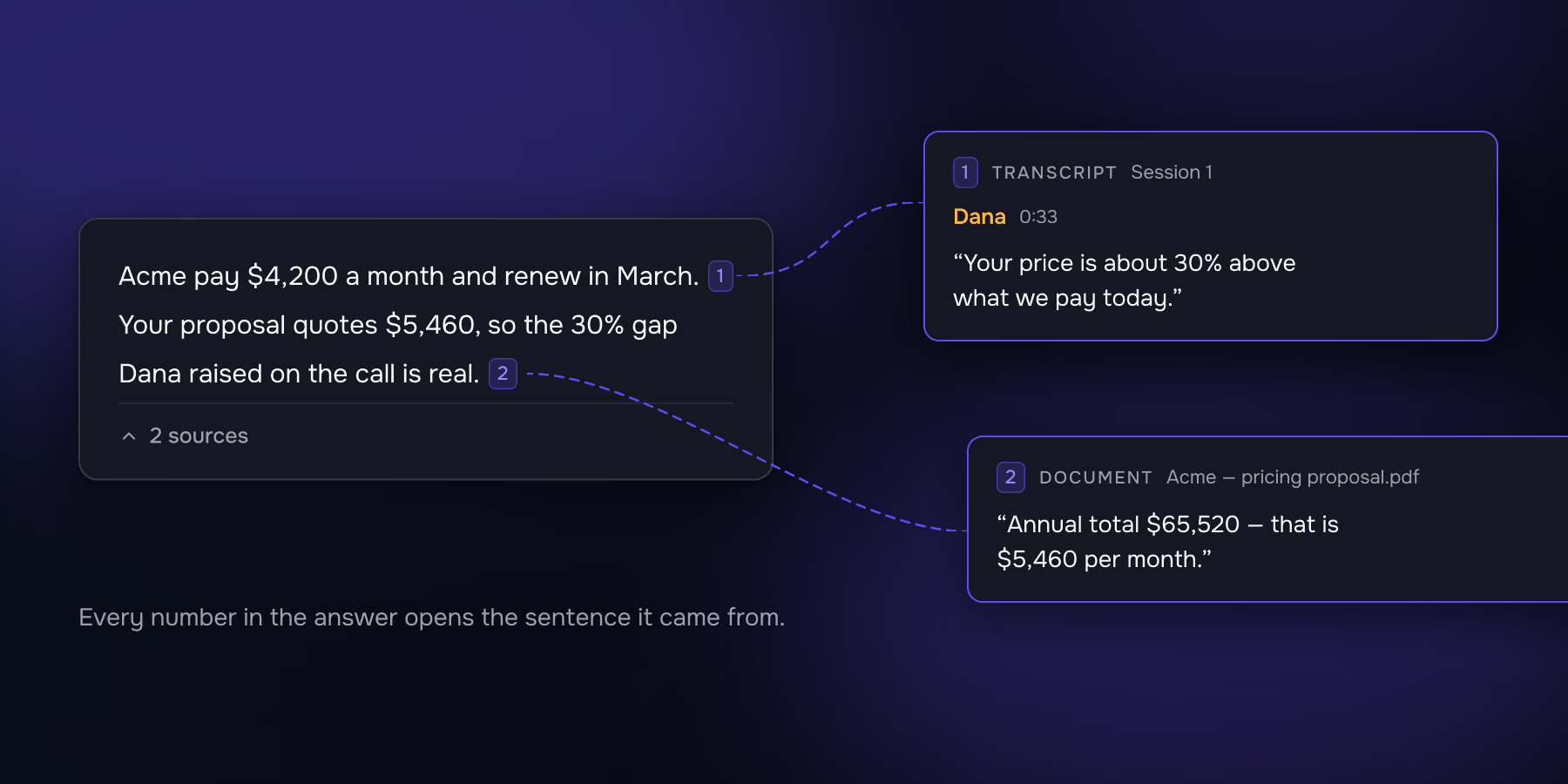
A general-purpose AI chat sitting on top of all of it. Open a thread with no meeting attached and it's simply an AI assistant — the kind of thing you'd otherwise open a separate tab for. Draft the proposal, think through a pricing decision, rewrite an email, work out what to ask in tomorrow's interview. The difference is what it's standing on: your transcripts and your documents are already in context, so "what did we quote them in March, and draft a follow-up on that basis" is one question rather than a copy-paste job across two apps. You pick the model, edit any message to branch a conversation without losing the original, and every answer stays cited.
Put together, that's the difference between a transcript archive and a working memory. Before the call, ask what you agreed last time and what the contract actually says. During it, pull an answer out of the spec while the question is still on the table. After, ask across the whole engagement — and then just keep working in the same place.
Every answer carries numbered citations. Click one and you land on the exact transcript line, document fragment, or earlier thread it came from — which is what makes it safe to repeat an answer to a customer.
3. Where does your audio actually go?
"No bot" and "on-device" are different claims. "No bot" is a statement about the meeting. "On-device" is a statement about your data. A tool can be entirely bot-free and still stream every second of audio to third-party cloud providers.
Granola is the clearest example. It captures audio locally and nothing joins the call, but it passes that audio to cloud transcription and AI providers for processing. Granola has said publicly that it tried on-device transcription and moved it to the cloud for quality.
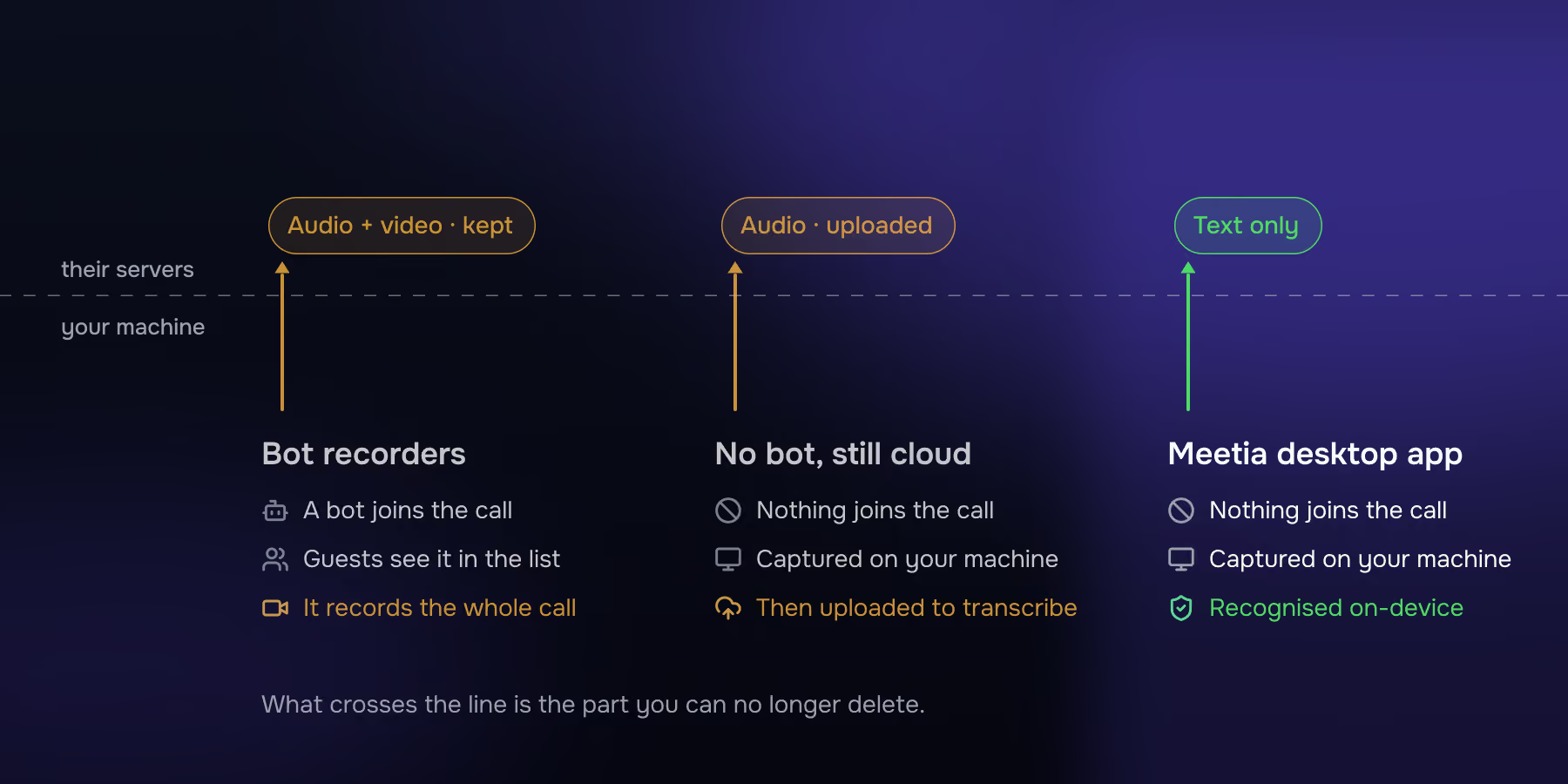
Meetia's Mac app recognises speech on your Mac. Only the resulting text is sent. Nothing is ever kept but the transcript — no audio, no video, on any platform, on any plan. That also means you can't re-listen to a call, which is a genuine trade-off and worth deciding on deliberately.
4. Does it connect to the rest of your stack — in both directions?
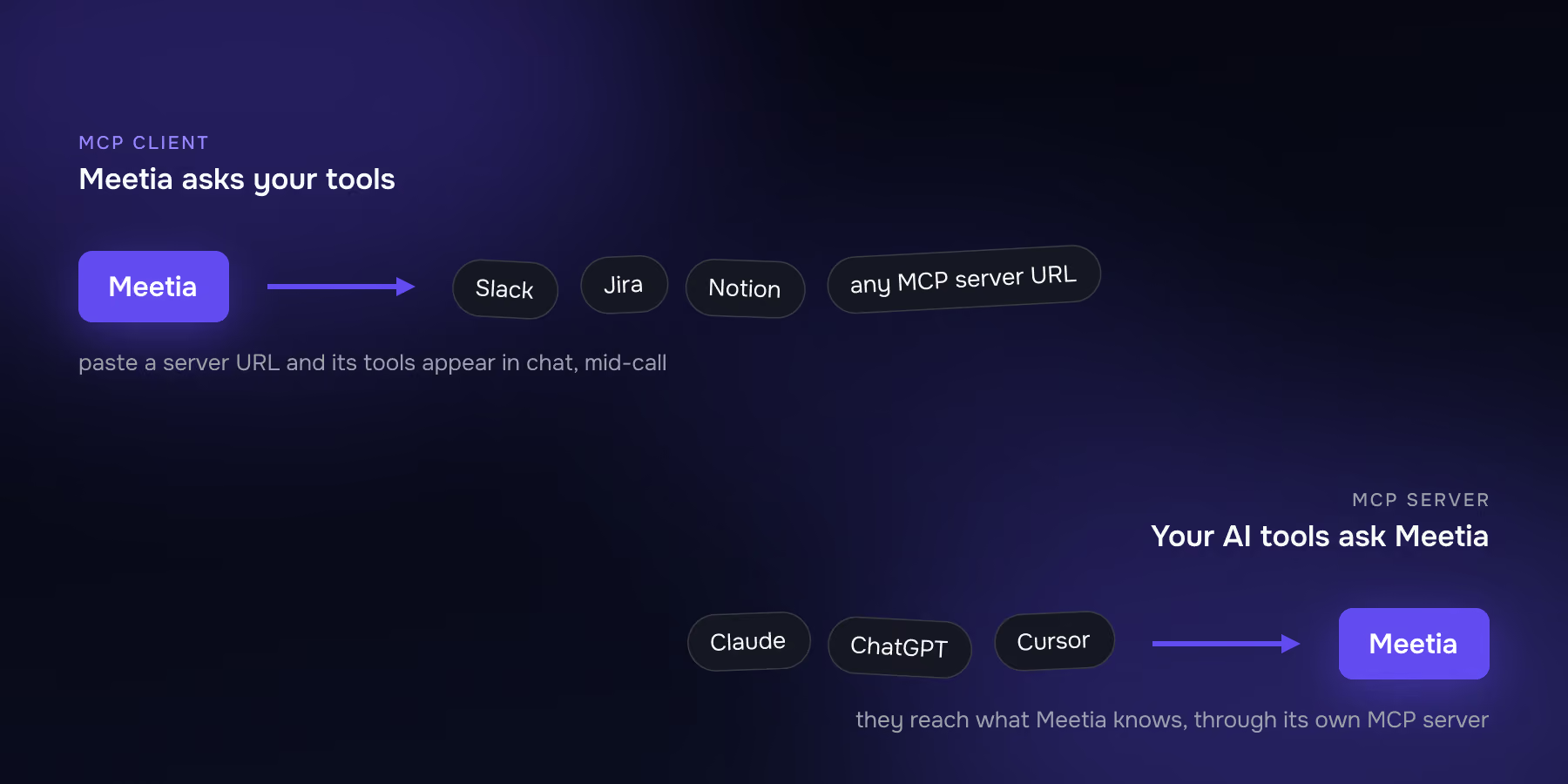
MCP is now table stakes, but most tools implement only half of it — knowledge flows out, nothing comes in.
Meetia does both. It ships its own MCP server, so Claude, ChatGPT or Cursor can reach what Meetia knows. And it works as an MCP client: paste in any remote MCP server's URL and that server's tools become available to the assistant inside chat, including while the call is running.
Google Calendar connects directly, without an MCP URL, and drives auto-recording: rules you set decide which meetings record themselves — has a video link, you're the organiser, within working hours, title contains or excludes certain words, attendee limits, accepted invitations only.
Conversations are where a company's decisions actually get made; that knowledge should flow into the tools people already work in, and those tools should be reachable from inside the conversation.
5. Does something join your call?
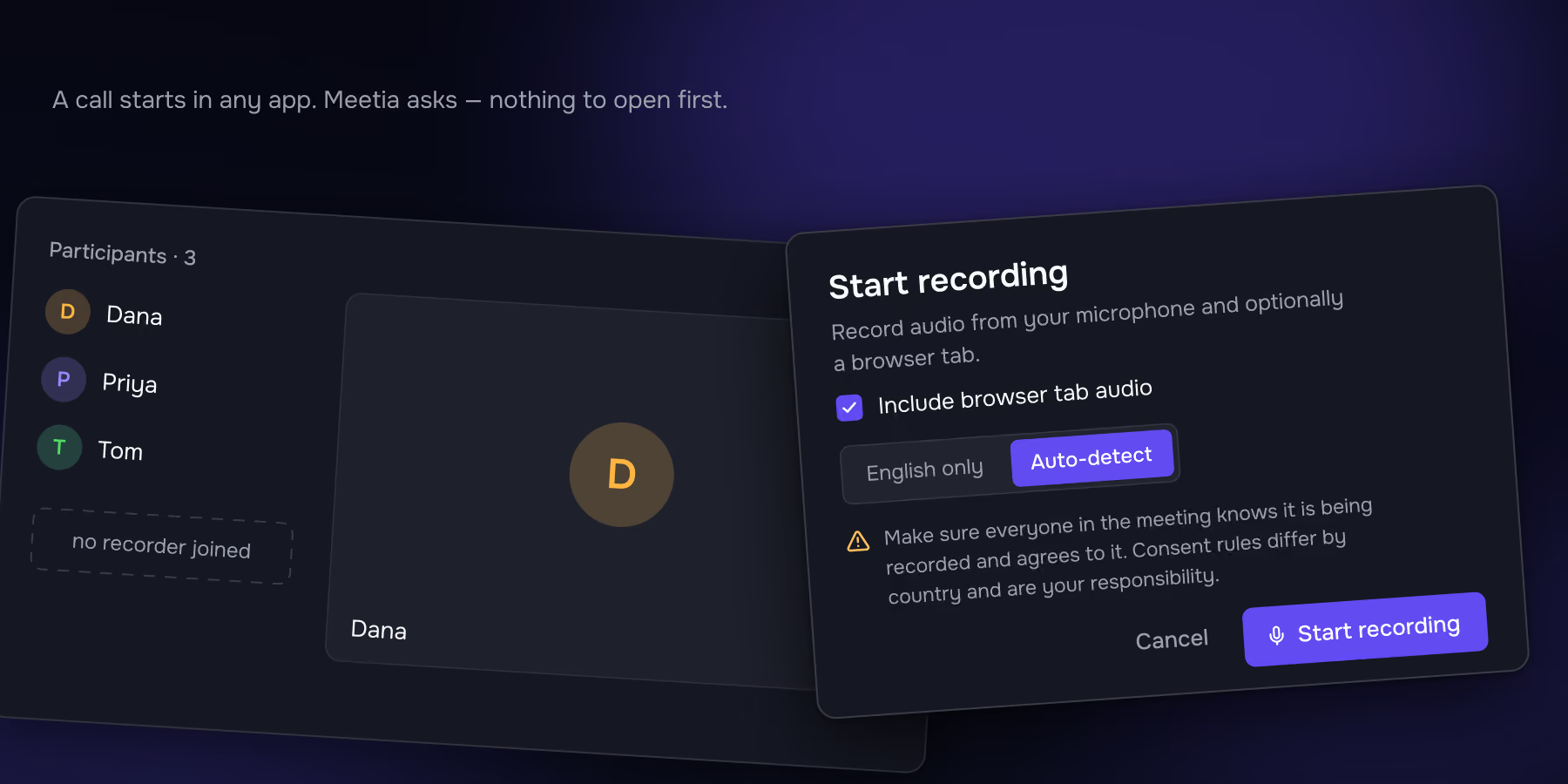
Most of meeting assistants send a bot into the meeting. It shows up in the participant list with a name like "Ali's Notetaker."
Meetia doesn't join, and recording runs from your own machine.
Meetia's Mac app automatically detects the call for you. Start one in any app and Meetia asks whether to record — one click, nothing to open first. It captures system audio, so both sides come through whether you're on speakers or headphones.
Nothing joins the call, so nobody is told a transcript is being made. That's on you. Each time Meetia reminds you to inform the participants that you are transcribing the call.
Consider options
Where each one is the better choice
Granola is the closest comparison and the best notes app in the category. It got the important thing right before most of the market: no bot, notes that complete what you were already writing rather than replacing it, no audio kept. If you take notes by hand and want them finished, or you need those platforms, take Granola seriously. Choose Meetia if the audio genuinely can't leave the machine, or if you want an assistant that knows the whole project — your documents included — and is somewhere you'd actually do the follow-on work.
Otter is the incumbent, with a mature mobile app and long-established CRM integrations. Its meeting transcription covers a much shorter language list than most rivals, which is a hard constraint if your calls aren't in English — Meetia handles around thirty languages on the web app, and a hundred languages on Mac app, with auto-detect. Choose Otter for platform maturity and mobile; choose Meetia if you meet in more languages, don't want a bot in external calls, or want the AI working inside the conversation.
Fireflies has the largest integration library in the category, over a hundred transcription languages, SOC 2 Type II on every tier, and HIPAA available at the enterprise level. If your requirement is a long compliance checklist or a very wide connector list, Fireflies clears bars we don't yet. Choose Meetia if you want a project brain rather than a searchable archive of individual calls.
Fathom is built around the recording, and it's very good at that. Unlimited capture, video replay, strong sales-team workflows. If your job is reviewing calls afterwards, that's the right shape. Choose Meetia if you want help while you're still on the call, or you can't have a recorder visible to the other side.
tl;dv has moved toward revenue intelligence — playbook scoring, cross-meeting analytics, CRM sync. Worth a look if you're a sales org that wants coaching rather than notes. Notta is the multilingual and file-upload option with a mobile-first workflow. Neither competes on the during-the-call or project-context questions; both beat us on breadth today.
If you're on your own, most of the team-oriented comparisons above stop mattering. What's left is whether the tool remembers anything, and whether you'd use it when there's no meeting on. Meetia's Inbox gives one person a private assistant with the same knowledge base, thread continuity and voice memos — and a general AI chat that already knows what you've been talking about all month. No workspace to set up, nobody to invite.